
+1 Katana Evolution Controls and HUD
PC click versus mobile tap, Auto Click, the four HUD panels, the X code icon, and Watch Ad x2.
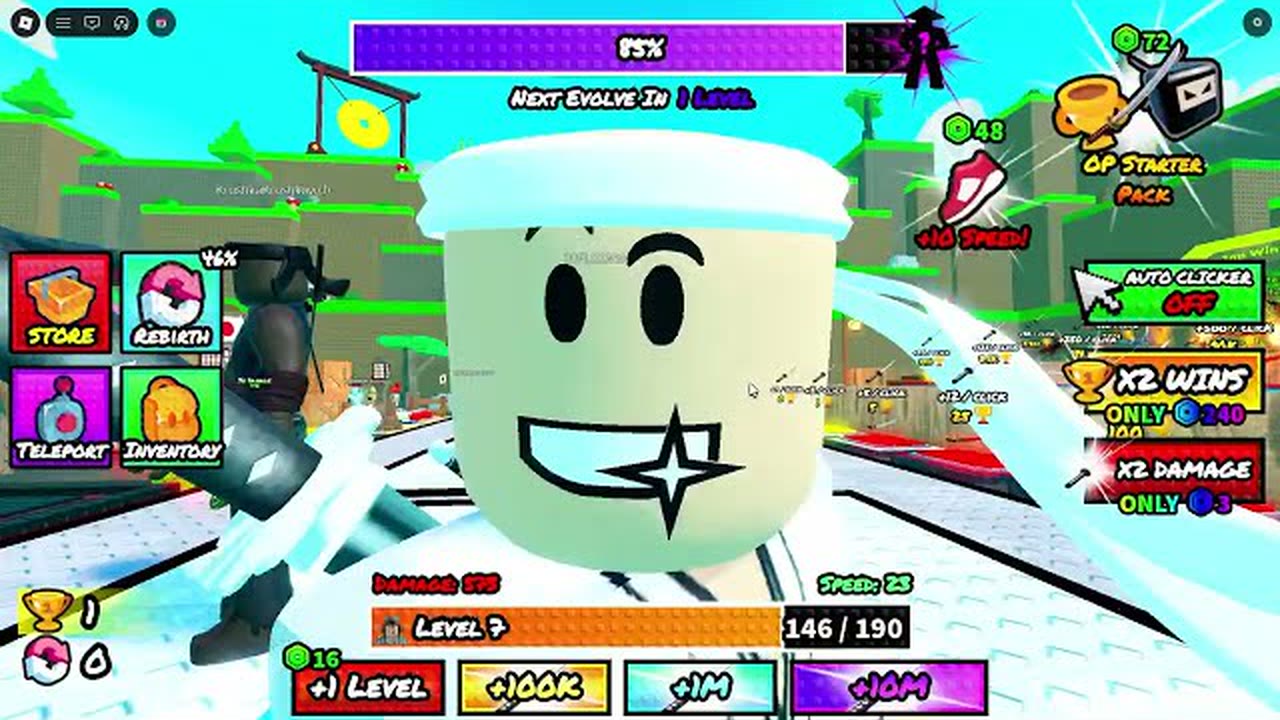
Every other guide on this wiki assumes you can find Store, Rebirth, Teleport, Inventory, Auto Click, Watch Ad, and the X/Twitter code icon. This page is that map. +1 Katana Evolution is a free Roblox incremental simulator: you click or tap to swing, you read Damage and Speed, you watch Level/XP, and you press HUD buttons that are not keyboard binds. If you just spawned, pair this with Getting Started so the buttons have a 30-minute plan. If you only need codes, skip to how to redeem after you join the group.
PC click versus mobile tap
On PC, a click swings the katana. Hold or repeat clicks to build power. On mobile, a tap is the same swing. There is no hidden combo string and no gamepad skill tree. Movement is ordinary Roblox WASD or thumb-stick. The skill is not the bind — it is circling the pack while the swings land. Circle-strafing around rookies, sensei, squires, and later wizards is how you stop dying in the middle of a cluster. Look at Damage on the HUD; that number has to match the stage gate. Speed is how fast the orbit feels.
Auto Click is an in-game toggle. Turn it on so the swing loop runs while you steer. External auto-clickers are a common PC habit in this genre; they are not part of the official HUD and this page will not tell you to install one. If you want automation beyond the toggle, the scripts hub exists as a topic index with auto-farm and auto-rebirth children. Those pages discuss what people automate. They do not paste executors, and neither does this one.
The four panels: Store, Rebirth, Teleport, Inventory
Store is where Wins become click upgrades and katanas. Bamboo is free at spawn. Wooden costs one Win. Fire and purple blades come later and persist after rebirth. If you cannot remember spend order, use How to Get Wins — pad first, then Store. Do not open Store in the middle of a Stage 4 pack; orbit, clear, pad, then shop.
Rebirth is a confirm panel, not a world pad. First rebirth is about x2. Three rebirths land near x5. You keep katanas. You should not press it before Stage 2 is a farm. Full rules are on How to Rebirth. If the panel is glowing and you still have bamboo plus a failed 300-damage hold, close it.
Teleport lists stages. It moves your character. It does not disable recommended damage. Stage 1 rookies, Stage 2 ~300, Stage 3 ~5,000, Stage 4 wipe check, Stage 5 30,444, later millions — that list lives on the Stages Walkthrough. Warp to a map you can hold. Landing on a million-damage label is a respawn, not a shortcut.
Inventory holds blades and pets you already own. Equip Best if the game offers it after a hatch. Eggs are not a HUD panel of their own; you hatch, then you equip here. Rare ~40%, Epic ~50%, Legendary ~10%, Secret ~0.20% (pink horned pet), plus Common and Uncommon. Rank pets on the pets tier list rather than starring every Common.
Numbers on the HUD
Damage is the gate stat. Speed is movement. Level/XP feeds the purple evolve bar that reads “Next Evolve In X Level.” That bar is evolve, not rebirth; the split is on How to Evolve. Separate buttons sit near the combat stats: +1 LEVEL, +100K, +1M, +10M. Those are spend/skip controls for level-like jumps. They are not Win printers and they are not stage skips. Watch Ad x2 is an optional double. Take it when a pack is almost a farm and you want the clear now. Ignore it when you are mid-orbit and opening the ad would get you killed.
Passes appear in Store or a matching pay panel: Starter Pack around 72 Robux, x2 Damage, x2 Wins around 240 Robux, +10 Speed. They are optional. The game has been live since 11 June 2026 as a free experience; you can finish this HUD tour without buying any of them. x2 Wins makes pads juicier. +10 Speed makes circling easier. Neither replaces Auto Click or the pad walk.
X/Twitter icon for codes
Codes are not in Store. Look at the top-right HUD for the X/Twitter icon. Join Gatto vs Denis (group 129736655) first or redeem will fail. Paste RELEASE or COOKED exactly — case-sensitive — and press Redeem. September 2026 rewards are 10K Wins for RELEASE and 50K Damage plus 1 Level for COOKED. The click-by-click version is how to redeem. Live strings sit on the Codes Hub. Discord and the group link are on community links. Do not type codes into the Roblox chat bar and do not type them into Rebirth.
Mobile versus PC hot-path
On mobile, enable Auto Click, keep a thumb on movement, and only open panels after a pad. The language of the HUD is the same as PC; the failure mode is covering the pack with a Store window. On PC, Auto Click plus mouse orbit is enough for Stage 1–2. If you tab out to read this wiki, expect to die; that is not a bug. 12-player servers are online and noisy, but progress is individual — nobody else can press your Rebirth, and you cannot press theirs.
Scripts and auto-clicker software are not HUD features. If a YouTube overlay shows extra buttons, those are not Gatto vs Denis UI. Use the in-game toggle. If you still want farm or rebirth automation as a concept, open the scripts hub and stop at the writeup. Do not paste a script into this game from a random chat because a HUD button was hard to see. The button is on this page. Find it, press it, circle the pack.
One-screen checklist
- Auto Click on. Circle the pack. Read Damage versus the gate.
- Clear, then GET +1 WIN. Then Store.
- Teleport only to a stage you can hold. Inventory to equip blades and pets.
- X icon for codes after the group join. Rebirth only after the Stage 2 farm test.
- Watch Ad x2 when you choose to, not when a wizard is mid-swing.
That is the entire control scheme. There is no secret key for evolve, no co-op interact, and no upcoming-access menu. Swing, orbit, pad, panel. If a number on this HUD still looks wrong, the problem is a build or a gate, not a missing bind — go back to Getting Started or the Guides Hub and pick the page that matches the number.
Frequently Asked Questions
Quick answers to the most common questions.
Is Auto Click a PC-only third-party tool?
No. Auto Click is an in-game toggle on the HUD. External clickers are a common PC habit, not a required control. For automation topics without pasted executors, see the scripts hub.
Where do I redeem codes?
Join Gatto vs Denis, then use the X/Twitter icon in the top-right HUD. Full steps are on how to redeem. RELEASE and COOKED are case-sensitive.
What do Store, Rebirth, Teleport, and Inventory do?
Store spends Wins. Rebirth applies multipliers and keeps katanas. Teleport hops stages without skipping damage gates. Inventory equips blades and pets.
What is Watch Ad x2?
An optional double on a push. It is not a Win printer and not a stage skip. Take it between packs, not while a Stage 5 cluster is hitting you.
Does mobile use different HUD buttons?
No. Tap replaces click. The same four panels, Auto Click, X icon, and Watch Ad are there. Open panels after a pad so the Store window does not cover the pack.
I cannot find a keyboard bind for evolve.
There is not one. Evolve is the purple “Next Evolve In X Level” bar. Read How to Evolve. Rebirth is a HUD panel, not a key.